
Updated
—
5 min read
How to use Amazon Creators API Node.js + Typescript (SDK)
If you're just looking for a quick answer, you can find a Node.js Typescript SDK for the Amazon Creators API here.
This SDK is a thin TypeScript wrapper that adds proper types without modifying the JS runtime internals, so it works exactly the same as the Node.js SDK for the Creators API.
Amazon is replacing its Product Advertising API (PA-API) with its new Creators API.
The PA-API will be deprecated on April 30th, 2026 according to the latest documentation updates.
This post will go over how to get started with the new Creators API and provide links to SDKs, including for Node.js / Typescript.
I'll be using my own site, BinSizes, as an example.
How to Access Amazon Creators API
1. Get an approved Amazon Associates account
First, you'll need to have an approved Amazon Associates account.
If you're already using the PA-API, you've already done this step.
If not, sign up and start sharing your affiliate links. You'll need 3 qualified sales (orders shipped) within 90 days. After reaching this, your site/app/social media will be manually reviewed to see if it follows the policy.
If rejected, you can make changes and re-apply immediately.
Some common reasons for rejection include:
- Listing out-of-date prices (prices can only be displayed if from the PA-API / Creators API)
- Price tracking or price alerting features (not allowed without prior approval)
- Missing or hidden affiliate disclosure
- Sparse content or no value-add (content needs to be unique)
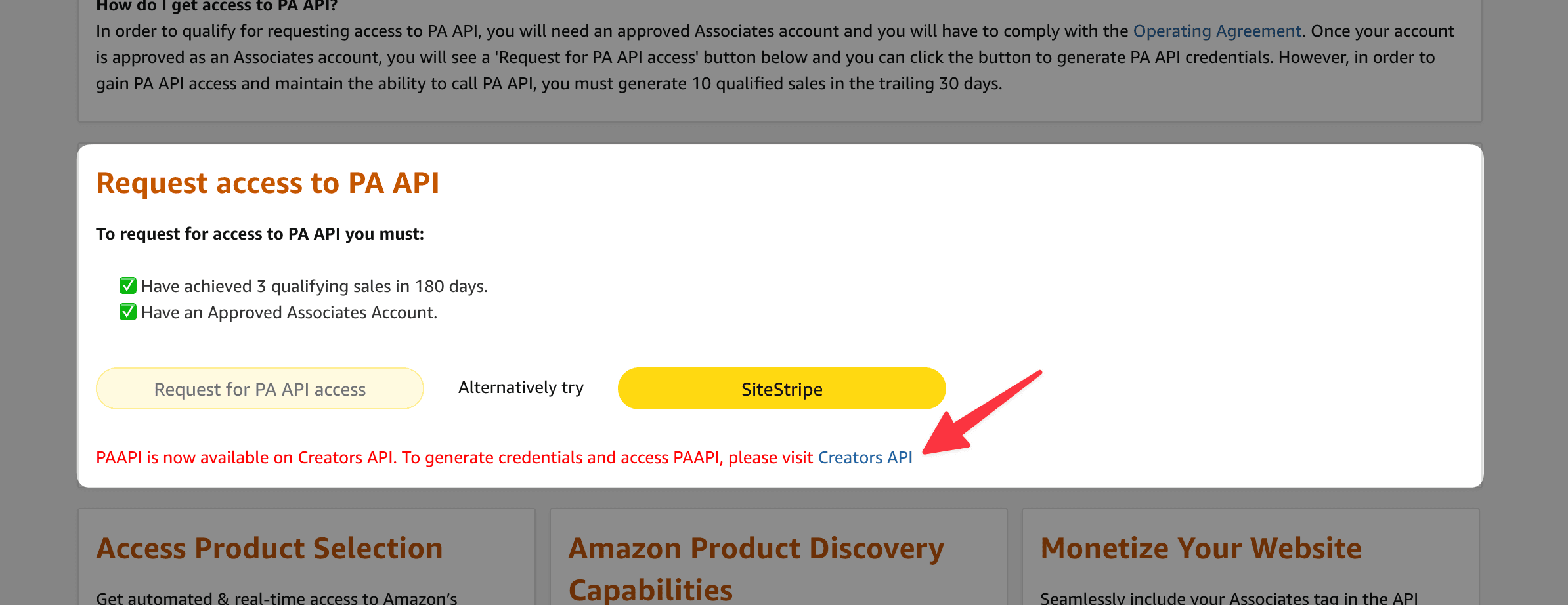
2. Register for the Creators API
Getting an approved Amazon Associates account is most difficult, especially if you're building automated tools like BinSizes.
You'll likely need to manually populate data to start and get traffic through marketing to reach the 3 sales threshold.
Once approved, you need to meet another sales threshold, according to Amazon:
"The current eligibility criteria to access the [Product Advertising API / Creators API] is that the account must have made 10 qualified sales in the trailing 30 days."
This requirement applies to each marketplace. If you want to use the Creators API for the US marketplace (www.amazon.com), you'll need 10 qualified sales in the past 30 days (on an ongoing basis) within this marketplace.
How to Use the Amazon Creators API
Once approved you can log into the Creators API dashboard and create an application.
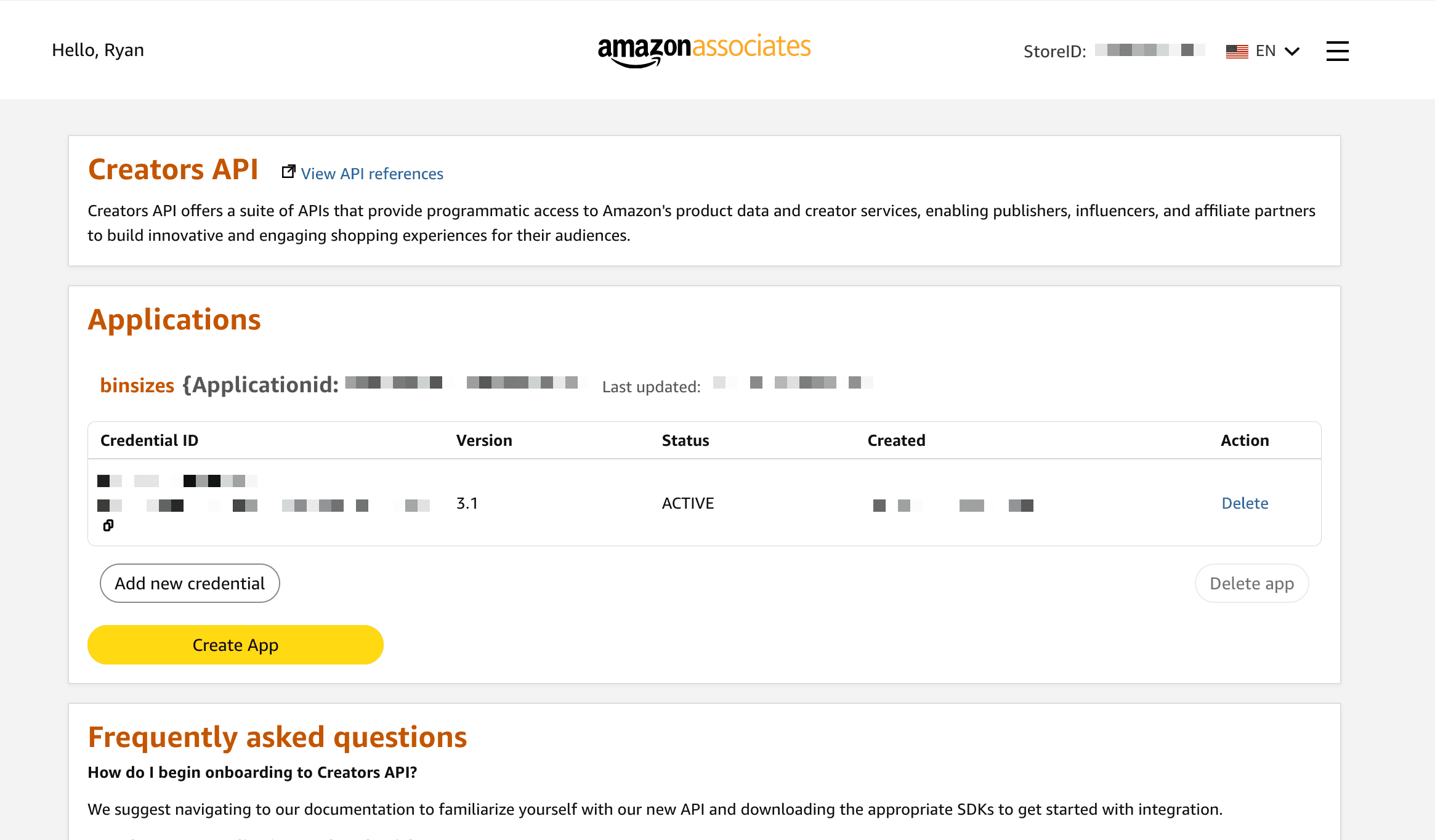
You'll get new credentials that allow you to authenticate with the Creators API.
Choose an SDK
As of writing, Amazon offers four SDKs for the Creators API:
Node.js is a popular option for modern applications. Unfortunately, Amazon does not offer a TypeScript SDK for the Creators API, but there is an unofficial TypeScript SDK for the Creators API.
NoteInterestingly, Amazon distributes the Node.js SDK as a .zip file! It's not currently available from NPM directly, which is an inconvenience.
Luckily, you can use this unofficial TypeScript SDK that I wrote exactly for this purpose.
This library is a thin TypeScript wrapper that adds proper types without modifying the JS runtime internals, so it works exactly the same as the Node.js SDK for the Creators API.
It's also available on npmjs.com for convenience, which is critical for CI/CD and keeping dependencies up-to-date.
Using the Amazon Creators API Node.js / Typescript SDK
Feel free to read the Github repo or npm package for more detail. Below I'll share a short example of how to use the TypeScript SDK for Amazon's Creators API.
Install the Amazon Creators API Typescript SDK
npm install amazon-creators-api
You'll need Node.js >= 18. This library has no runtime dependencies which makes it lightweight and reliable.
Get Items via Creators API
Here's an example of how to use the "get items" endpoint of the Creators API.
import { ApiClient, GetItemsRequestContent, GetItemsResource, TypedDefaultApi, } from "amazon-creators-api"; // Initialize API client const apiClient = new ApiClient(); // Add credential details // You can find these in the Creators API dashboard: https://affiliate-program.amazon.com/creatorsapi apiClient.credentialId = "<YOUR CREDENTIAL ID>"; apiClient.credentialSecret = "<YOUR CREDENTIAL SECRET>"; apiClient.version = "<YOUR CREDENTIAL VERSION>"; // Initialize typed API wrapper const api = new TypedDefaultApi(apiClient); /** * Sample function to demonstrate GetItems API usage */ async function getItems(): Promise<void> { /** * Add marketplace. For more details, refer: https://affiliate-program.amazon.com/creatorsapi/docs/en-us/api-reference/common-request-headers-and-parameters#marketplace-locale-reference */ const marketplace = "<YOUR MARKETPLACE>"; // e.g. "www.amazon.com" for US marketplace // Create GetItems request // Enter your partner tag (store/tracking id) const partnerTag = "<YOUR PARTNER TAG>"; // Choose item id(s) - ASINs to retrieve const itemIds = ["B0DLFMFBJW", "B0BFC7WQ6R", "B00ZV9RDKK"]; const getItemsRequest = new GetItemsRequestContent(partnerTag, itemIds); /** * Choose resources you want from GetItemsResource enum * For more details, refer: https://affiliate-program.amazon.com/creatorsapi/docs/en-us/api-reference/operations/get-items#resources-parameter */ const resources = [ "images.primary.medium", "itemInfo.title", "itemInfo.features", "offersV2.listings.price", "offersV2.listings.availability", "offersV2.listings.condition", "offersV2.listings.merchantInfo", ].map((resource) => GetItemsResource.constructFromObject(resource)); getItemsRequest.resources = resources; try { const response = await api.getItems(marketplace, getItemsRequest); console.log("API called successfully."); console.log("Complete Response:\n", JSON.stringify(response, null, 2)); } catch (error) { console.log("Error calling Creators API!"); console.log("Full Error Object:\n", JSON.stringify(error, null, 2)); }
And that's it!
Wrapping up
While Amazon does provide a Node.js SDK, it does not have proper TypeScript types and is not published to NPM.
Luckily, the unofficial Amazon Creators API for Node.js / Typescript offers both these important features, making it easy to use the new Creators API with full TypeScript compatibility.
Just install, add your credentials, and start calling the Creators API fully in TypeScript.
Hope this helps! Feel free to leave comments/problems on the Github repo's issues page or reach out to me.
Join my newsletter for lessons, experiments, and failures in bootstrapping online businesses.
Sign up if you're curious. I’ll only email you if it's actually good.

Meet the Author
Ryan Chiang
Hello, I'm Ryan. I build things and write about them. This is my blog of my learnings, tutorials, and whatever else I feel like writing about.
What I'm currently building →.