Updated
—
2 min read
Cursor TSServer Crash / Hanging Fix
How to fix Cursor TSServer crashing or hanging: 'TSServer exited. Code: null. Signal: SIGTERM'
Using Cursor (a VSCode fork) in a large Typescript monorepo project, I came across an issue where the tsserver process would crash, hang, or otherwise be excruciatingly slow.
The Output pane in Cursor would show something like this:
2025-12-05 11:18:12.688 [info] <semantic> Starting... 2025-12-05 11:18:12.699 [info] Killing TS Server 2025-12-05 11:18:12.699 [info] Starting TS Server 2025-12-05 11:18:12.699 [info] Using tsserver from: /Applications/Cursor.app/Contents/Resources/app/extensions/node_modules/typescript/lib/tsserver.js 2025-12-05 11:18:12.699 [info] <syntax> Forking... 2025-12-05 11:18:12.699 [info] <syntax> Starting... 2025-12-05 11:18:12.699 [info] <semantic> Forking... 2025-12-05 11:18:12.699 [info] <semantic> Starting... 2025-12-05 11:18:12.703 [error] TSServer exited. Code: null. Signal: SIGTERM
I tried disabling all extensions, upgrading Cursor, clearing the cache, checking for circularity (Type instantiation is excessively deep and possibly infinite.ts(2589) was popping up suddenly), etc.
The solution I overlooked is much simpler: point the tsserver process to your workspace's tsserver.js file.
{ "typescript.tsdk": "node_modules/typescript/lib" }
Or from the Typescript: Select Typescript Version command:
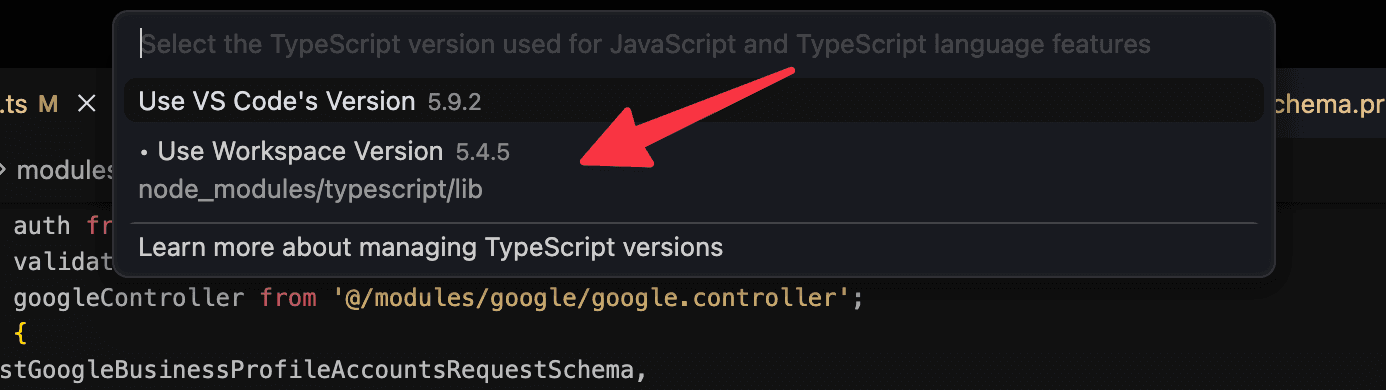
If still encountering issues, then you can try the other steps like Developer: Reload with Extensions Disabled, upgrading cursor, and clearing the cache.
Hope this helps.
Join my newsletter for lessons, experiments, and failures in bootstrapping online businesses.
Sign up if you're curious. I’ll only email you if it's actually good.

Meet the Author
Ryan Chiang
Hello, I'm Ryan. I build things and write about them. This is my blog of my learnings, tutorials, and whatever else I feel like writing about.
What I'm currently building →.